C# Example
Below is a example of an integration of the ColonyCam Client written in C#. The example runs the following actions.
- Initialise the ColonyCam
- Open the drawer
- Close the drawer
- Take an image
Prerequisites
To test this example you should complete the following steps
- Create a new console application in Visual Studio.
- You will also need the server address of the ColonyCam.
The Code
The logic for invoking the endpoints has been separated into a dedicated ColonyCamClient class. Create a new class with this name and copy and paste the following code into it, ensuring that the DefaultAddress is corrected to match the server address listed in API Mode of the ColonyCam software
using System.Net;

namespace CSharpColonyCamClient
{
    /// <summary>
    /// Initializes a new instance of the ColonyCamClient class.
    /// </summary>
    /// <param name="baseAddress">The base IP Address and port.</param>
    public class ColonyCamClient(string baseAddress = ColonyCamClient.DefaultAddress) : IDisposable
    {
        #region Constants

        private const string DefaultAddress = "http://192.168.1.0:8080";
        private const string InitialiseEndpoint = "/v1/initialise";
        private const string OpenDrawerEndpoint = "/v1/open-drawer";
        private const string CloseDrawerEndpoint = "/v1/close-drawer";
        private const string ImageEndpoint = "/v1/image";

        #endregion

        #region Fields

        private HttpClient? client;

        #endregion

        #region Properties

        /// <summary>
        /// Get or set the base IP Address and port.
        /// </summary>
        public string BaseAddress { get; } = baseAddress;

        #endregion

        #region Methods

        /// <summary>
        /// Get an HTTP response from an API endpoint.
        /// </summary>
        /// <param name="endpoint">The endpoint.</param>
        /// <param name="headerAcceptValue">The value for the accept header.</param>
        /// <returns>The HTTP response from the API endpoint.</returns>
        private async Task<HttpResponseMessage> GetResponse(string endpoint, string headerAcceptValue)
        {
            var response = new HttpResponseMessage();

            try
            {
                var address = $"{BaseAddress}{endpoint}";
                using (client = new HttpClient())
                {
                    client.DefaultRequestHeaders.Clear();
                    client.DefaultRequestHeaders.Add("Accept", headerAcceptValue);

                    response = await client.GetAsync(address);
                }
            }
            catch (InvalidOperationException e)
            {
                response.StatusCode = HttpStatusCode.BadRequest;
                response.ReasonPhrase = $"Invalid operation: {e.Message}";
            }
            catch (HttpRequestException e)
            {
                response.StatusCode = HttpStatusCode.BadRequest;
                response.ReasonPhrase = $"Request error: {e.Message}";
            }
            catch (TaskCanceledException e)
            {
                response.StatusCode = HttpStatusCode.RequestTimeout;
                response.ReasonPhrase = $"Request timeout: {e.Message}";
            }
            catch (UriFormatException e)
            {
                response.StatusCode = HttpStatusCode.BadRequest;
                response.ReasonPhrase = $"Invalid URL format: {e.Message}";
            }
            catch (Exception e)
            {
                response.StatusCode = HttpStatusCode.InternalServerError;
                response.ReasonPhrase = $"Unhandled error: {e.Message}";
            }

            return response;
        }

        /// <summary>
        /// Request  to initialise a ColonyCam.
        /// </summary>
        /// <returns>An HTTP response representing the result of the action.</returns>
        public async Task<HttpResponseMessage> RequestInitialiseAsync()
        {
            return await GetResponse(InitialiseEndpoint, "text/plain");
        }

        /// <summary>
        /// Request to open the drawer.
        /// </summary>
        /// <returns>An HTTP response representing the result of the action.</returns>
        public async Task<HttpResponseMessage> RequestOpenDrawerAsync()
        {
            return await GetResponse(OpenDrawerEndpoint, "text/plain");
        }

        /// <summary>
        /// Request to close the drawer.
        /// </summary>
        /// <returns>An HTTP response representing the result of the action.</returns>
        public async Task<HttpResponseMessage> RequestCloseDrawerAsync()
        {
            return await GetResponse(CloseDrawerEndpoint, "text/plain");
        }

        /// <summary>
        /// Request to get an image.
        /// </summary>
        /// <returns>An HTTP response representing the result of the action.</returns>
        public async Task<HttpResponseMessage?> RequestGetImageAsync()
        {
            return await GetResponse(ImageEndpoint, "application/octet-stream");
        }

        #endregion

        #region Implementation of IDisposable

        public void Dispose()
        {
            client?.Dispose();
        }

        #endregion
    }
}
Overwrite the contents of the Program.cs file with the following
using System.Net;
using CSharpColonyCamClient;

namespace Application;

class Program
{
    private static async Task Main()
    {
        var client = new ColonyCamClient();

        using (client)
        {
            // initialise ColonyCam
            var initialiseResponse = await client.RequestInitialiseAsync();
            var initialiseResponseContent = initialiseResponse.Content.ReadAsStringAsync().Result;
            Console.WriteLine($"Initialise status code: {initialiseResponse.StatusCode}");
            Console.WriteLine($"Initialise response: {initialiseResponseContent}");

            // open the drawer
            var openDrawerResponse = await client.RequestOpenDrawerAsync();
            var openDrawerResponseContent = openDrawerResponse.Content.ReadAsStringAsync().Result;
            Console.WriteLine($"Open drawer status code: {openDrawerResponse.StatusCode}");
            Console.WriteLine($"Open drawer response: {openDrawerResponseContent}");

            // close the drawer
            var closeDrawerResponse = await client.RequestCloseDrawerAsync();
            var closeDrawerResponseContent = closeDrawerResponse.Content.ReadAsStringAsync().Result;
            Console.WriteLine($"Close drawer status code: {closeDrawerResponse.StatusCode}");
            Console.WriteLine($"Close drawer response: {closeDrawerResponseContent}");

            // get the image
            var imageResponse = await client.RequestGetImageAsync();

            // save the image
            if (imageResponse?.StatusCode == HttpStatusCode.OK)
            {
                Console.WriteLine($"Take Image status code: {imageResponse.StatusCode}");
                Console.WriteLine("RequestGetImageAsync data received. Saving to file...");
                var bytes = await imageResponse.Content.ReadAsByteArrayAsync();
                await File.WriteAllBytesAsync("image.png", bytes);
                Console.WriteLine("RequestGetImageAsync saved as image.png");
            }
            else
            {
                var imageResponseContent = imageResponse?.Content.ReadAsStringAsync().Result;
                Console.WriteLine($"Image response: {imageResponseContent}");
            }
        }
    }
}
Run the program
Once finished, the console output should look like this
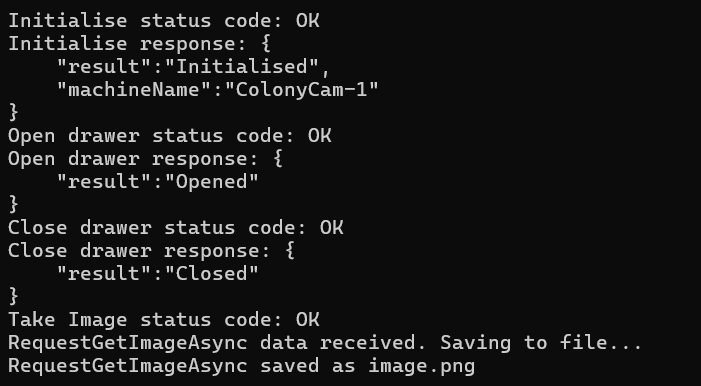
Browse your file system to confirm that the image has been saved to the specified destination.